Ashutosh Bhosale
Full-Stack Content Marketer
I help you say the right things to the right people in the right way so that they find you, like you, trust you, and hence, choose you.Or to put it simply, I handle end-to-end content marketing—strategy, execution, and distribution.I specialize in case studies.

© Ashutosh Bhosale. All rights reserved.
Selected Work
Narrative-Driven, ICP-Tailored Case Studies
Grist: Partnering with a web dev agency can help publishers bring their most ambitious projects to life and even win awards
Manheim: How an auto auctions giant eliminated their marketing team's dependency on developers and maximized ROI on marketing by migrating to a better-suited CMS.
Everyday Carry: Editorial teams at lifestyle magazines work faster and pain-free when they ditch their custom CMSes for modern, publishing-friendly CMSes.
Dealertrack: How an industry leader in dealership software publishes marketing content 50% faster with a website migration to WordPress.
Content Marketing & Other Sales Enablement
TOFU SEO Dev-Rel / Thought Leadership Article (ranks #2 for target keyword and cited in AI answers from Google and Perplexity in the US)
Communications
UX Writing
Projects
Case Study Academy: A course on case study writing for web dev agencies
Contact
What can I do for you? Just ask, it's okay if you aren't sure.
Thank you
Thanks for getting in touch! I'll get back to you pronto.
Case Study: UX Copy for a Google Plugin
Overview
| My Role | UX Writer |
| Surface | In-product template gallery: Google Web Stories plugin for WordPress |
| Scope | Template titles, template descriptions |
| Scale | 100,000+ active installations as of 2024 |
Result
Template titles and descriptions for the Web Stories plugin shipped to over 100,000 active installations. Written without a brief, developed from first principles, covering templates across travel, food, tech, fashion, fitness, and entertainment.
Background
Google's Web Stories plugin for WordPress lets users create swipeable, full-screen visual stories similar to Instagram or Snapchat Stories from their WordPress dashboard. To get started, users pick from a gallery of pre-built templates.
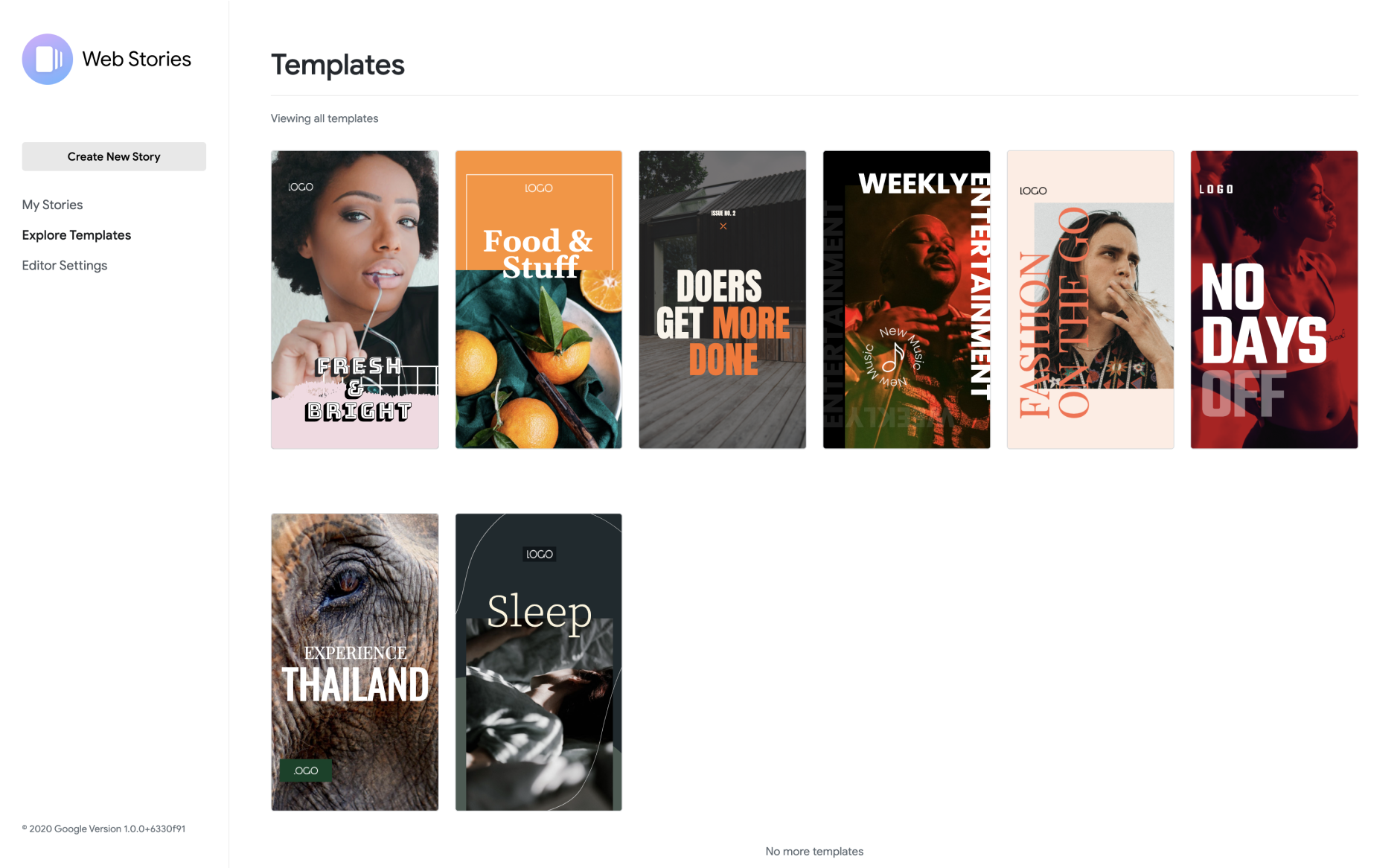
I was brought onto this project at rtCamp, which was working with Google on the plugin. My job was to write the copy for the template gallery: the title and description that appeared on each template card, for templates covering multiple niches.There was no formal brief, no examples to follow, and no guidelines. I looked at each template and wrote what I thought would help a user understand what it was for and decide whether to use it.
The Users
The plugin's initial rollout targeted large publishing / media companies across a variety of niches. The plan was to gain traction with larger players first, then grow to smaller publishers and individual creators. But the plugin was open to anyone on WordPress from day one, so the copy had to work for both: a domain specialist at a media company scanning for templates that match their niche, and a solo blogger figuring out what they want to make.
The Problem
When a user opens the template gallery, they're asking the question: "Which template out of all these is best for the content I want to create?" They're looking for a starting point that fits their content goal. So the copy needed to do one job: help the user select the right template, fast.
My Approach
Without a brief, I developed my own instincts by looking at each template carefully and asking: if I were a blogger or creator, what would I need to know about this to pick it? Three principles guided my decisions:
Name the content format when possible. Words like guide, recap, tutorial, itinerary, and packing list tell the user what content formats the template is best suited for.
Indicate the niche. The title or description must help users identify whether the template matches their domain. Together, format and niche communicate the full use case.
Flag customization when it matters. When a template is flexible enough to use beyond its obvious use cases, the description should say so, giving users permission to mix and match.
Selected Work
Here are eight examples from the template gallery, selected to show range across niches and content formats.


What I'd Do Differently Now
Looking at this work now, three things stand out:
Most descriptions led with the aesthetic, not the use case. Across most of the descriptions, I led with a brief visual reference before arriving at the use case. For example, "This template's beautiful blue-green palette will let you create helpful travel and backpacking stories" opens with a visual, then pivots immediately to the use case in the same sentence. The use case always got there, but it didn't always come first. In a template gallery where users are scanning quickly, leading with the use case every time (and putting visuals secondary) would serve them better. The three descriptions where I did lead directly with the use case: Kitchen Stories, Summer Fashion Collection, and All About Cars, are the clearest and most immediately scannable of the set.
Some titles were too geographically specific. Titles like "12 Hours in Barcelona" limit their perceived audience by naming a place. A creator in Mumbai or Lagos is less likely to reach for a template with "Barcelona" in the name, even if it would work perfectly for their content. I'd generalize this to something like "One Day Itinerary." It signals the same format, but has a global reach.
A few descriptions described audience outcomes that were incomplete. In a tool made for creators, mentioning what the audience will feel is legitimate, but the feeling needs to be tied to a specific outcome to be actionable. For example, "visual articles that will enthuse and motivate your audience" starts the right thought but doesn't finish it. Motivated to do what? A stronger version would be "inspire your audience to plan their next city trip." That completes the thought, giving the creator a clear picture of what job this template helps them accomplish.
I'd document the naming rules for future contributors. When you write the first set of template names, you're also implicitly creating the rules for the next hundred. I didn't document those rules at the time. There was no brief going in, and I didn't create one going out. But now I'd write a short naming spec covering: title format (2-4 words, use-case-led), description length limit (2 sentences max), forbidden patterns (no geographic specificity unless intentional, no superlatives without evidence), and localization flags. That would make the system scalable beyond the first batch.
Outcome
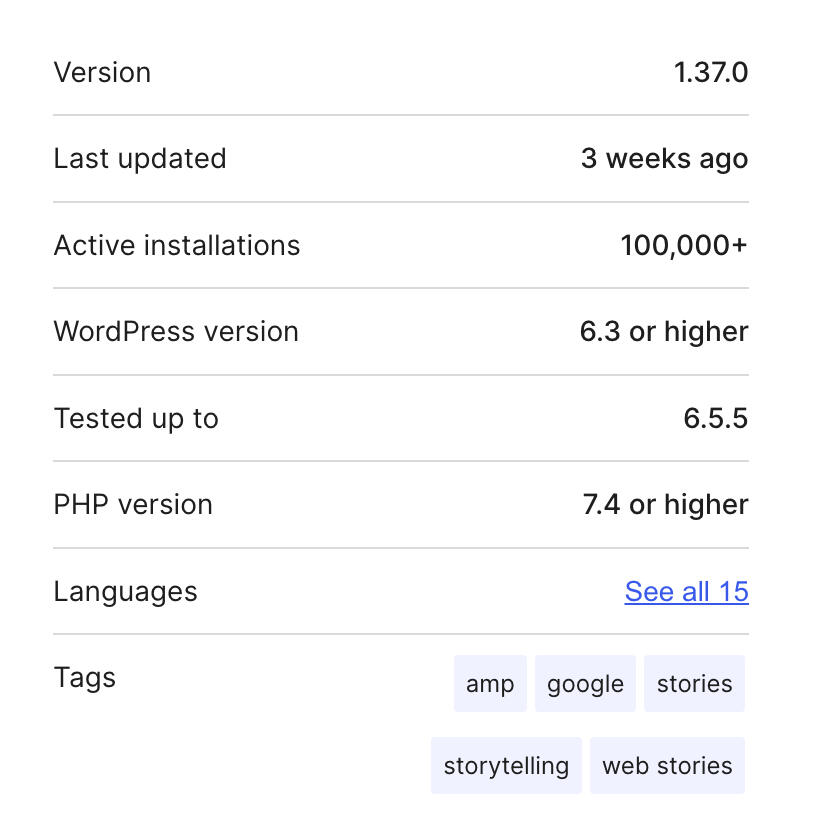
The Web Stories plugin for WordPress reached 100,000+ active installations as of July 2024.
Template copy is the first decision point in the creation flow. Users choose their starting template before writing a single word or adding any visual asset to their story. Getting that naming and description right reduces friction and sets users up quickly with the right structure from the start.
This was my first in-product UX writing project. I wrote about what it felt like at the time on my blog.